

Your watch stopped ticking at the worst possible moment, and now you’re staring at a dead second hand wondering what comes next. Here’s the good news: learning how to change Fossil watch battery yourself takes about fifteen minutes, a few cheap tools, and zero trips to a jeweler.
This isn’t a generic watch-repair rundown. It’s built around the specific screws, case types, and battery codes that Fossil actually uses in 2026, so you’re not guessing your way through it.
Why Your Fossil Watch Battery Died (And When to Expect It Again)
Quartz watches run on tiny silver-oxide or lithium cells that power a small motor inside the movement. That motor ticks the second hand roughly once per second, and each tick drains the cell a little further.
Most Fossil quartz watches run for 18 to 24 months on a single battery before it needs swapping. If your watch stops well before that window, and a fresh battery drains again within six months, the movement itself may be developing a fault rather than the battery simply running out.
A dead battery shows up in one of three ways: the second hand freezes on one spot, it starts jumping in two-second increments (a low-battery warning built into many movements), or a digital display goes fully blank. Any of those is your cue to act.
What You Need Before You Start
Skipping tools is the single biggest reason people crack a case back or scratch a crystal. Gather these first:
- A case back opener or a set of watch-back removal pliers
- A small Phillips or flathead screwdriver, matched to your case type
- Non-magnetic tweezers
- The correct replacement battery
- A soft cloth or rubber mat to work on
- A small tray or dish to keep screws from rolling away
Fossil uses several battery sizes across its range, and grabbing the wrong one is the second most common mistake. The exact code is usually stamped on the back of the old battery itself, so hang onto it until the new one is confirmed to match.
| Watch Type | Common Battery Code | Typical Lifespan |
|---|---|---|
| Standard analog quartz | SR621SW, SR626SW | 18–24 months |
| Larger case / chronograph quartz | SR920SW, SR927SW | 12–18 months (multi-function drains faster) |
| Slim digital display | CR2016, CR2025, CR2032 | 24–36 months |
| Hybrid smartwatch | CR2430 | 4–6 months |
The “SW” suffix simply marks a silver-oxide watch cell, which holds voltage more steadily than standard alkaline batteries and is the reason quartz watches keep such accurate time right up until the battery finally quits.
Not every Fossil is even a battery watch to begin with. Fossil also sells automatic and hand-wound mechanical models, which run on a wound mainspring instead of a cell. If the second hand sweeps smoothly rather than ticking once per second, or the watch stops after a day or two of sitting still, it’s likely mechanical and doesn’t need this guide at all.
How to Change Fossil Watch Battery: Step-by-Step
Once your tools and battery are on hand, the actual swap is straightforward. Here’s how to change Fossil watch battery from a cold start to a ticking second hand.
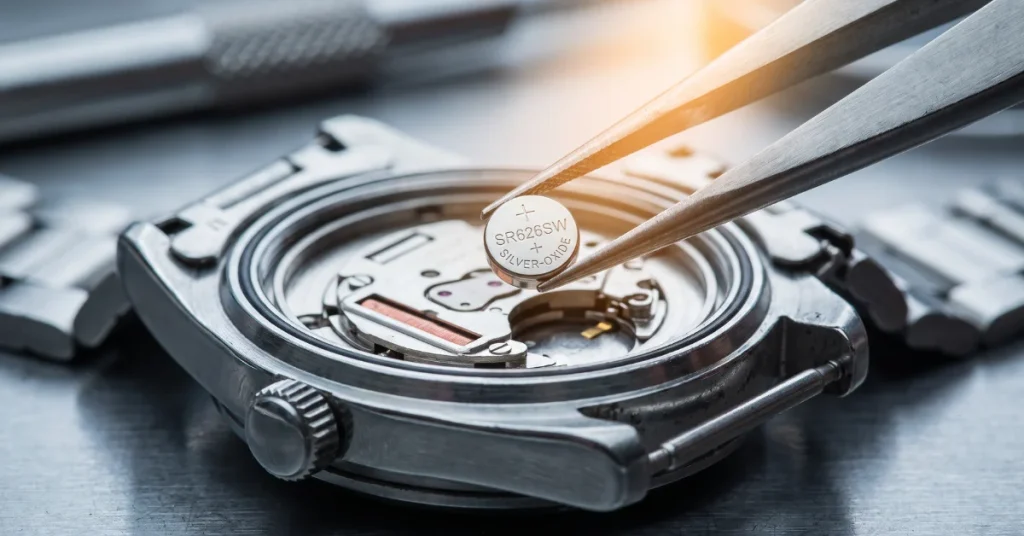
1. Identify your case back type. Flip the watch over. A screw-back case has four small screws around the rim. A snap-back case has no visible screws and a thin lip you pry against instead.
2. Open the case. For screw-backs, remove each screw and set them in your tray in the order they came out, since case backs aren’t always perfectly symmetrical. For snap-backs, use a case knife or a flat tool along the lip and gently work around the edge until it pops.
3. Note the battery’s position. Before touching anything, look at how the battery sits, which way the positive (+) marking faces, and how the retaining clip holds it in place. A quick phone photo here saves guesswork later.
4. Remove the old battery. Use tweezers to lift it out from the side, never straight up against the clip, which can bend the contact and cause connection problems later.
5. Match the replacement. Compare the printed code on the old cell against the new one. If they don’t match exactly, stop and source the correct battery rather than forcing a close substitute.
6. Insert the new battery. Slide it in with the positive side facing the same direction as the one you removed, then press gently until the clip seats fully. The second hand should start moving within a few seconds.
7. Reseal the case. Screw-backs go back on with the screws snug but not overtightened, since stripped threads are a real risk. Snap-backs need firm, even pressure around the entire rim until you hear it click into place.
8. Test before you wear it. Set the correct time, check that the date function advances properly if your model has one, and give it a few minutes to confirm the second hand keeps steady rhythm.
Screw-Back vs Snap-Back: Why It Actually Matters
Anyone who has opened more than a handful of watches knows the case type changes everything about the approach. Screw-back cases are more forgiving for beginners because the screws give a clear, controlled entry point. Snap-back cases reward patience but punish rushing, since forcing a case knife in the wrong spot can scratch the case edge or tear the internal gasket.
Water-resistant Fossil models almost always use one of these two designs specifically to protect that gasket seal. Once you’ve opened the case, that seal is compromised until it’s professionally re-pressed, which is worth knowing if you swim or shower with your watch regularly.
What the Research Shows
Detailed analysis of Fossil’s own product documentation shows the brand builds a one-year limited warranty into new watches covering material and workmanship defects, though normal battery depletion falls outside that coverage since it’s considered routine wear. When examining Fossil’s customer care guidance closely, the company points owners toward its own service network or authorized retailers for battery swaps on watches still under warranty, since opening the case yourself can affect warranty terms on some models.
Research into repair-community documentation for popular Fossil references, such as the FS-4494 line, consistently shows the same failure pattern: watches that stop working shortly after a fresh battery install almost always trace back to incorrect polarity or a battery that doesn’t match the original thickness, not a defective movement.
Common Mistakes That Ruin a Battery Swap
A few missteps show up again and again among first-timers, and each one is avoidable.
- Forcing a snap-back case open with pliers instead of a proper case knife, which chips the case rim
- Touching the new battery with bare fingers, since skin oils can interfere with the contact surface
- Buying a battery by size alone without checking the exact code, which leads to a cell that’s slightly too thick or thin
- Overtightening case-back screws until the threads strip, especially on older or budget models
- Skipping the “before” photo, then guessing at polarity and installing the battery backward
Handling Digital and Hybrid Fossil Models
Not every Fossil owner is working with a classic three-hand analog watch, and the process shifts slightly for digital and hybrid smartwatch lines. Digital Fossil watches typically use a CR2016 or CR2032 cell and often have a smaller, more delicate circuit board sitting just beneath the battery compartment, so extra care with static and moisture matters here. Fossil’s hybrid smartwatches, which combine analog hands with a connected app, use a CR2430 cell and generally reset their Bluetooth pairing after a battery change, so plan on reconnecting the companion app afterward.
If your model has a rotating crown with smart functions, note its exact position before removing the case back, since some hybrid movements need the crown reset to a specific alignment for the hands to sync correctly with the app again.
Should You DIY It or Pay for Service?
Anyone who has managed a small home repair kit knows the calculation here comes down to watch value and case type. A budget Fossil with a simple screw-back case is a reasonable first project. A high-value Fossil with a snap-back case and active water resistance is a tougher call, since a botched gasket seal can cost more to fix than the battery swap saved.
Professional battery replacement through a jeweler or Fossil’s own service centers typically includes a pressure test on water-resistant models, which is the piece most home repairs skip entirely. If you swim, dive, or work outdoors with your watch on, factor that into the decision alongside the straightforward mechanics of how to change Fossil watch battery on your own.
| DIY at Home | Jeweler / Service Center | |
|---|---|---|
| Cost | Battery only, a few dollars | Roughly $10–$50, more with a water-resistance pressure test |
| Time | 10–20 minutes | Often same-day, sometimes 1–2 weeks for pressure testing |
| Water-resistance check | Not included | Usually included on water-resistant models |
| Best for | Non-water-resistant, screw-back, low-value watches | Water-resistant, snap-back, sentimental, or high-value watches |
Disposing of the Old Battery Safely
Once the swap is done, the old cell shouldn’t just go in the household trash. Button cell batteries contain metals that are considered hazardous waste in most areas, and they’re small enough to pose a swallowing risk around kids and pets. Most pharmacies, hardware stores, and electronics retailers keep a small battery recycling bin near the checkout counter specifically for cells like these, and dropping the old one there takes about ten seconds on your next errand run.
Conclusion
Once you’ve done it a single time, changing a Fossil watch battery stops feeling like a repair and starts feeling like routine maintenance. The tools are inexpensive, the process takes under twenty minutes for most screw-back models, and the payoff is a watch that’s ticking again without a shipping delay or a service fee. Whether you’re working through your first swap or refining a process you’ve already tried, knowing how to change Fossil watch battery correctly keeps your timepiece running accurately for years to come.
FAQs
How often does a Fossil watch battery need replacing?
Most Fossil quartz models run 18 to 24 months per battery under normal wear, though heavy use of chronograph or digital functions can shorten that window.
Can I use any battery, or does it have to be an exact match?
It has to match the printed code exactly. A battery that’s even slightly thicker or thinner than the original can prevent the case back from sealing properly or stop the movement from making contact.
Will opening the case void my Fossil warranty?
It can, depending on the model and how recently the watch was purchased. Checking Fossil’s own warranty terms before opening a newer watch is worth the two minutes it takes.
Why does my watch still not run after I installed a new battery?
Check the polarity first, then confirm the battery is fully seated under the retaining clip. If both check out and it still won’t run, the movement itself has likely failed.
Is it normal for the second hand to jump in two-second steps?
Yes, that’s an intentional low-battery signal built into most quartz movements, and it means a replacement is due soon rather than immediately urgent.